
How to learn Excel, and why most people never quite do
Almost everybody who sets out to learn Excel has already tried once or twice. The usual approach is to watch somebody competent use it, which produces the feeling of understanding and almost no ability to do it. What produces ability is writing formulas yourself, being wrong, and being told exactly what was wrong.

This is a method, not a playlist. It is opinionated, it is shorter than most advice on the subject, and the honest summary is that about 7 hours of typing into a grid will take you further than any amount of watching.
Why watching does not work
A video of somebody writing a VLOOKUP is extremely easy to follow. Every step makes sense as it happens, the result works, and you finish feeling like you could do it. Three days later, in front of your own data, you cannot, and the usual conclusion is that you are bad at Excel.
You are not. Watching tests recognition, and the thing you need at work is recall. They feel identical from the inside and they are different abilities: recognising a formula when you see it costs nothing, and producing one from a blank cell is the entire job. Nothing you did while watching ever asked you to produce anything, so nothing was practised.
The same goes for following a written tutorial with the answer visible, and for copying a formula off a forum and pasting it in. Both work. Neither teaches, and that is why people arrive at their third attempt at learning Excel convinced it is harder than it is.
What works instead
Three things, and the third is the one almost nothing does.
- 1
Produce, do not follow
Start from a blank cell and a stated goal. If the answer is on the screen while you type, you are copying, and copying is the activity that felt like learning last time.
- 2
Be wrong early and often
A formula that fails and gets explained is worth ten that worked. Errors are where the model in your head gets corrected, and a session where nothing went wrong taught you nothing.
- 3
Be marked on the method
This is the one that matters. If something only checks your answer, you can type the right number by hand and be told you are correct, which teaches exactly the habit that ruins spreadsheets.
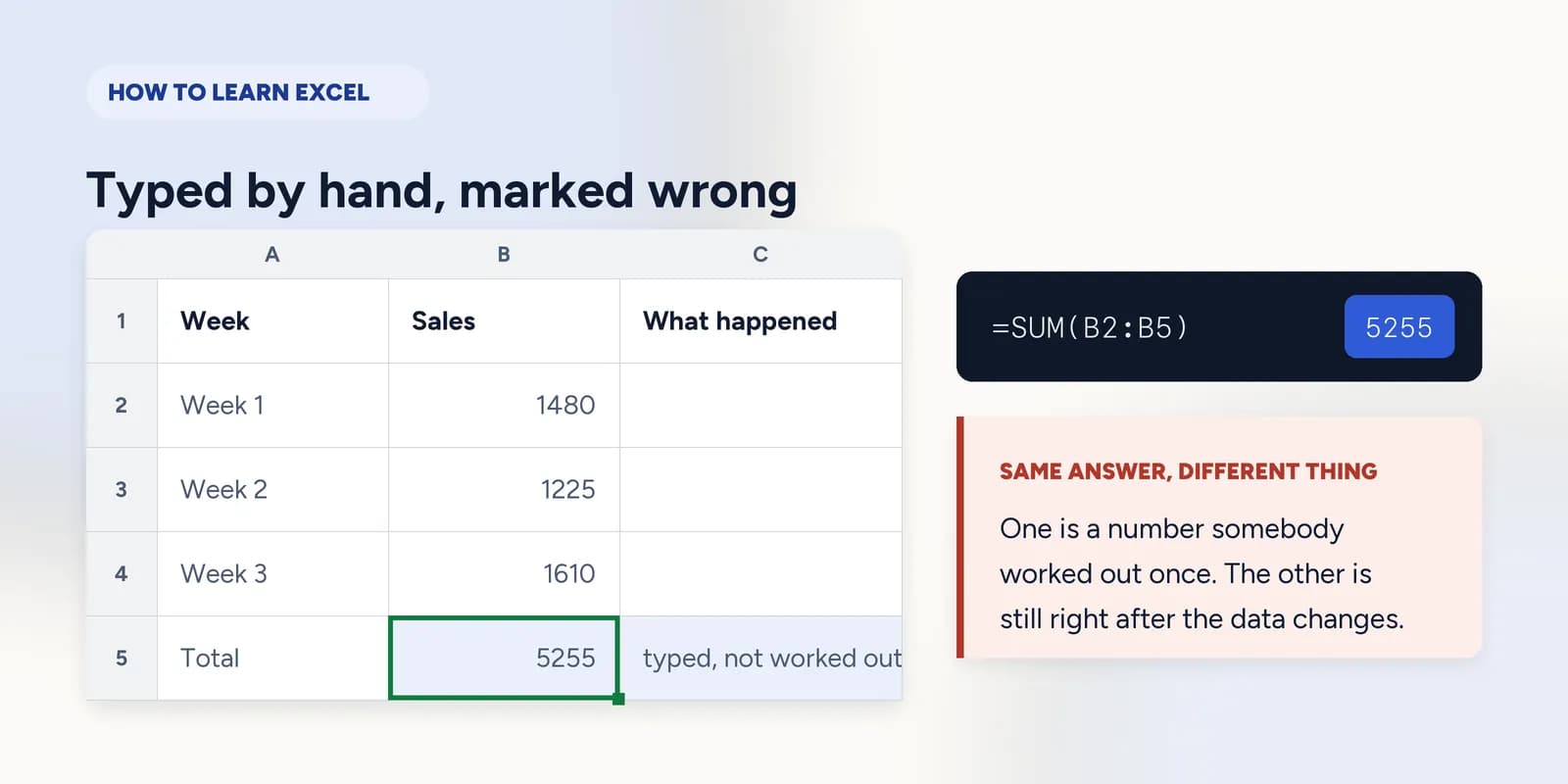
That third point is the whole design of this site, so it is worth showing rather than claiming. The grid below totals four weeks. The answer is 5,255 either way:
Typed by hand
5255
Marked wrong here. It is the right number and it will still say 5,255 after somebody edits Week 3.
Worked out
=SUM(B2:B5)
Marked right. It is a record of a calculation, so it is still correct next month.
| A | B | |
|---|---|---|
| 1 | Week | Sales |
| 2 | Week 1 | 1480 |
| 3 | Week 2 | 1225 |
| 4 | Week 3 | 1610 |
| 5 | Week 4 | 940 |
| 6 | Total | 5255 |
The total above was produced by the spreadsheet engine this site runs, not typed into the page.
Try it, twenty seconds
Type 5255 and check it. It is the right total and it will not pass, because the thing being taught is the formula. Then type one.
Add the four weeks of sales
Enter a SUM formula in B6, then check your work.
Hint: a range from B2 to B5 is written B2:B5.
The order to learn things in
Excel has several hundred functions and you will use about twenty. The order below matters more than the list, because each one is much harder than it needs to be without the one before it. Most people who stall on lookups stalled on the dollar sign two steps earlier and did not notice.
What a cell address means, and what a formula is. An hour, and nothing after it makes sense without it.
Arithmetic that points at cells, and the order Excel does it in.
The five functions that answer most questions about a column.
The dollar sign. This is where most people's formulas quietly break.
Making the sheet decide something, and getting the boundary right.
Matching one table against another. This is the one on the job description.
After those six, what you need depends on what you do. Text functions if your data arrives messy, charts if you present, dates and rounding if you report on anything monthly. The full course lists all 17 parts in teaching order.
How long it actually takes
Two honest numbers, both from this course rather than from a guess.
3–4 hours
To stop being frightened of a spreadsheet: cells, formulas, totals, and copying a formula without it breaking. That is the first five parts.
~7 hours
All 84 exercises, through lookups, charts and data work. Measured from the exercises themselves, not rounded up to sound thorough.
What that does not mean is 7 hours in a weekend. Spread the same hours over three or four weeks and you will remember considerably more of it, because the gaps are doing work: every session that starts by recalling what you did last time is a free round of the practice that actually builds recall.
Anybody telling you Excel takes six months is selling six months of something. Anybody telling you it takes an afternoon is describing recognition, not recall.
What you can learn without paying
A fair amount, and it is worth saying plainly because most pages on this subject do not. You do not need to buy anything to get competent at Excel.
- 19 exercises here need no account and no card. That covers cells, ranges, formulas and totals, which is the part that stops people.
- 46 of the 84 are free once you have an account, which exists so your progress survives a new laptop rather than to gate anything.
- Every written guide and every teaching page on this site is free to everybody, including the function reference.
- Microsoft's own documentation is free, accurate and better than most paid courses at explaining what a function does.
- Your own work is the best material there is. A real spreadsheet you need for something will teach you faster than any exercise, as long as somebody checks it.
What money buys is structure and correction: an order that builds, and something that tells you which of your habits is wrong before it reaches a spreadsheet somebody depends on. That is what the later parts here are, and it is a reasonable thing to decline.
How to tell it is working
Confidence is a bad gauge: it arrives after watching and leaves in front of real data. These are checkable instead. You are getting somewhere when:
- You can say what a copied formula will become before you copy it.
- You reach for a range rather than a chain of plus signs, without deciding to.
- A #N/A makes you check for a trailing space rather than makes you start again.
- You notice that a total covers one row fewer than the table it sits under.
- You can explain to somebody else why typing the answer in is worse than a formula that gives the same answer.
None of those is a function. They are all habits, which is what Excel competence actually consists of, and they are the reason a course organised around being corrected produces something a course organised around topics does not.
Common questions
How long does it take to learn Excel?
The useful parts take about 7 hours of actually doing things, spread over a few weeks rather than a weekend. That is the figure for the 84 exercises in this course, measured rather than estimated. Getting to a level where a spreadsheet at work stops being frightening is nearer three or four hours; the rest is lookups, data work and the mistakes that cost people afternoons.
What is the best way to learn Excel?
Type formulas into a spreadsheet and get told when they are wrong. Reading and watching feel like learning and produce almost no ability to do the thing: the recall is never tested, so nothing has to be retrieved. Any route that makes you produce an answer and corrects it beats any route that does not, which includes this site and also includes doing real work badly for a month.
Can I learn Excel on my own?
Yes, and most people do. What you need is not a teacher but a source of correction, because the thing that stalls self-teaching is a wrong habit nobody contradicts. Exercises with checked answers, or a colleague who reads your sheets, both solve it.
What should I learn first in Excel?
Cell addresses, then formulas that point at cells rather than contain numbers, then SUM and AVERAGE, then the dollar sign. Those four get you most of the way to useful. Lookups come after, and they are much easier once copying a formula holds no surprises.
Do I need to pay to learn Excel?
No. 19 exercises here need no account at all and 46 of 84 are free with one, every written guide on the site is free, and Microsoft's own documentation is free and good. Paying buys structure and correction, not information.
How can I learn Excel fast?
Narrow it. Pick the one thing your work actually needs, learn that properly, and come back for the next one. Three hours on lookups beats thirty hours of a general course you abandon in week two, and almost nobody needs the whole of Excel.