
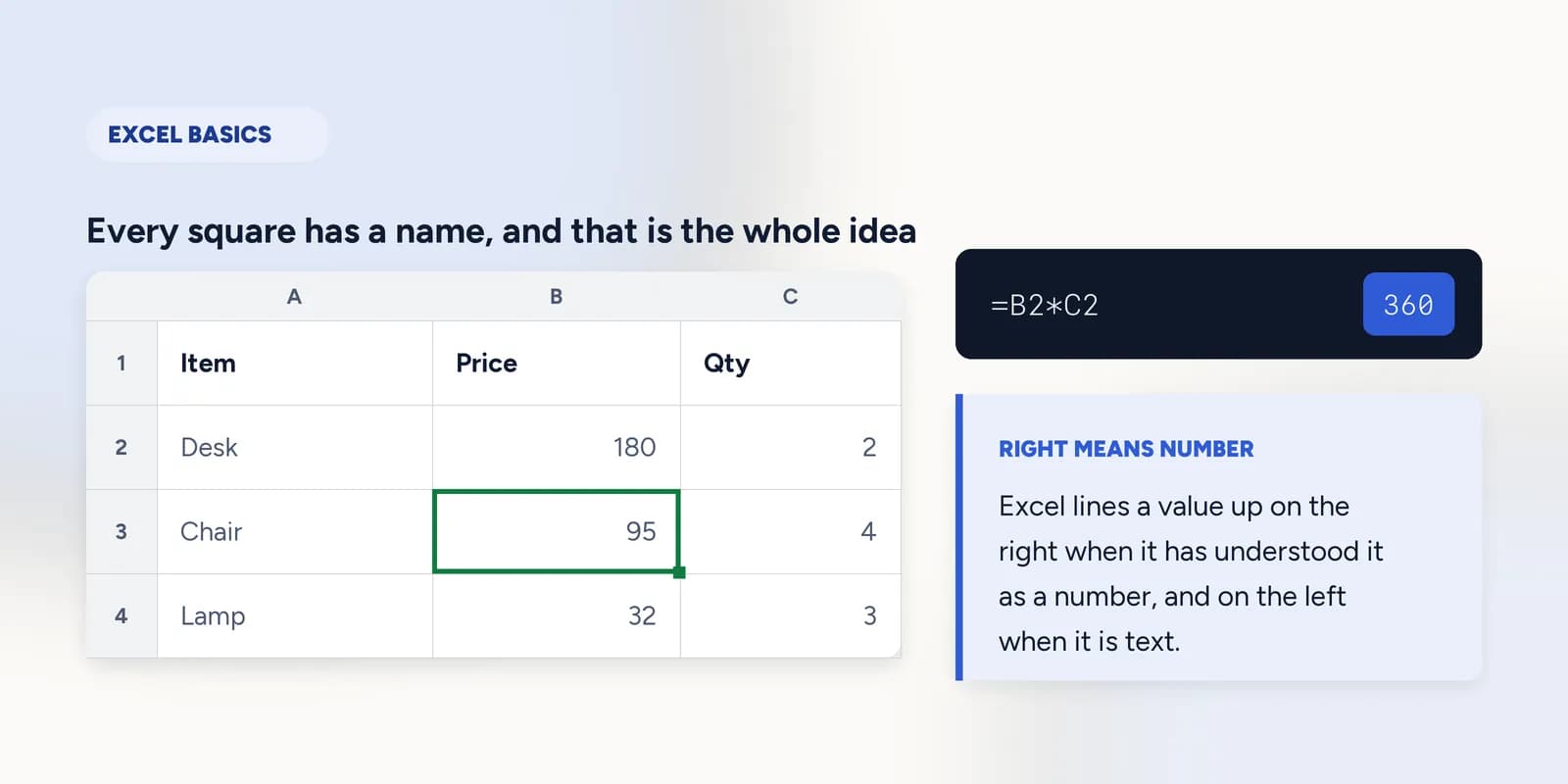
Excel basics, starting from clicking a cell
A spreadsheet is a grid of cells, each named by its column letter and row number, so C4 is the cell in column C, row 4. You click a cell, type into it, and press Enter. A formula is anything you type that starts with an equals sign: it points at other cells instead of holding a value of its own, and it recalculates whenever those cells change.

Most Excel courses begin at the point where you already know what a cell is. This part does not. It begins with clicking one square in a grid and typing in it, because that is where a real beginner actually is, and because every later idea in Excel is built on the fact that each square has a name.
There are only four ideas in this part, and none of them takes long. Where a cell is. What its address means. What a formula is. And what the grid is telling you when it does something that looks like a fault and is not.
A cell, and why it has a name
The grid is columns labelled with letters across the top and rows numbered down the side. Where a column and a row meet is a cell, and the cell's name is simply the two put together: column letter first, then row number. B3 is column B, row 3. There is nothing more to it, but the order matters, and 3B means nothing at all.
| A | B | C | |
|---|---|---|---|
| 1 | Item | Price | Qty |
| 2 | Desk | 180 | 2 |
| 3 | Chair | 95 | 4 |
| 4 | Lamp | 32 | 3 |
That naming is the whole reason spreadsheets work. Because every square has a name, you can write something in one cell that refers to another, and Excel will keep the two in step for you. Without addresses, a spreadsheet is a table you have to retype every time a number changes.
What a formula actually is
A formula is anything you type into a cell that starts with an equals sign. The equals sign is the signal: it tells Excel that what follows is an instruction to work something out rather than a value to store. Everything else about formulas follows from that one convention.
=B2*C2Two desks at 180 each. The formula holds no numbers of its own, only the addresses of the two cells it multiplies.
The thing worth noticing is what the formula does not contain. It does not contain 180, and it does not contain 2. It contains the addresses of the cells those numbers happen to be in today. Change the price in B2 and the answer updates on its own, because the formula was never about the number.
This is also why typing the answer in by hand is a different act from writing a formula, even when both produce 360. One of them is a record of a calculation and the other is a number somebody once worked out. Six months later, only one of them is still right.
Two things that look like errors and are not
Beginners meet two alarming-looking cells in their first hour, and neither of them is a fault. Knowing that saves a surprising amount of time.
- A cell full of ##### hash marks. The column is too narrow for the number to be printed. The value is intact; widen the column and it reappears. Excel does this rather than show a truncated figure, because half a number is worse than no number.
- A column of digits sitting on the left of its cells. Those are not numbers, they are text that looks like numbers, usually because they came from an export or were typed with a stray space. SUM will skip them without complaining, which is how a total quietly comes out too low.
What goes wrong
These are the mistakes this part exists to prevent. Each one is reasonable, which is why people make it and why nothing on the sheet objects.
Typing the answer instead of a formula
WhyIt gives the right number immediately, and on a small sheet the difference is invisible. Nothing tells you anything is wrong, because today nothing is.
InsteadPoint at the cells: =B2*C2 rather than 360. The answer is the same now and keeps being the same after somebody edits a price.
Reading an address as 3B rather than B3
WhyRow-then-column is the order most people say out loud, and the grid is read left to right everywhere else.
InsteadColumn letter first, always. Excel will not accept 3B, and every function you meet later expects the letter-then-number form.
Treating ##### as a broken cell and retyping the value
WhyA cell full of hash marks looks like corrupted data, and retyping does make it go away temporarily.
InsteadWiden the column. The value was never damaged, and retyping a number you cannot currently see is how a correct figure gets replaced with a wrong one.
Common questions
What is a cell in Excel?
A cell is one square in the grid, named by its column letter and row number. C4 is the cell where column C and row 4 meet. Every cell holds one thing: a number, some text, or a formula.
What does the equals sign do in Excel?
It marks the start of a formula. Without it, =B2*C2 would be stored as the text you typed. With it, Excel works out the answer and recalculates whenever B2 or C2 changes.
Why is Excel showing ##### instead of my number?
The column is too narrow to print the number. Nothing is wrong with the value. Drag the border between the column headings, or double-click it, and the column sizes itself to fit.
Do I need to buy Excel to learn this?
No. The exercises in this part run in a spreadsheet in your browser that behaves the way Excel does, and the first few need no account at all. What you learn transfers directly to Excel, Google Sheets and Apple Numbers.
How long does it take to learn Excel basics?
The ideas on this page take under an hour. Making them automatic takes a few sessions of actually typing into a grid, which is what the eight exercises in this part are for.