
SUM, AVERAGE, MIN, MAX and COUNT
SUM adds a range, AVERAGE takes its mean, MIN and MAX find the extremes, and COUNT says how many cells hold a number. All five ignore blank cells and text rather than treating them as zero, which is why AVERAGE over a column with a gap divides by the number of real entries, not by the number of rows.

Five functions answer most of the questions anyone asks about a column of numbers: how much altogether, what is typical, what is the smallest, what is the largest, and how many are there. Their syntax is identical and takes about a minute to learn.
What takes longer is knowing what each one does with the cells that are not quite numbers, because that is where a total ends up plausible and wrong. A blank, a zero and a figure stored as text are three different things to these functions, and only one of them is visible at a glance.
Five functions with one shape
Every one of these takes a range and returns a single number. Once you can write one you can write all five, and the range notation is doing most of the work.
| A | B | |
|---|---|---|
| 1 | Rep | Units |
| 2 | Ada | 12 |
| 3 | Blake | 7 |
| 4 | Chen | 19 |
| 5 | Dara | 4 |
| 6 | Eli | 15 |
| 7 | Fay | |
| 8 | Total | 57 |
=SUM(B2:B7)The blank is skipped rather than added as zero, which for a total makes no difference.
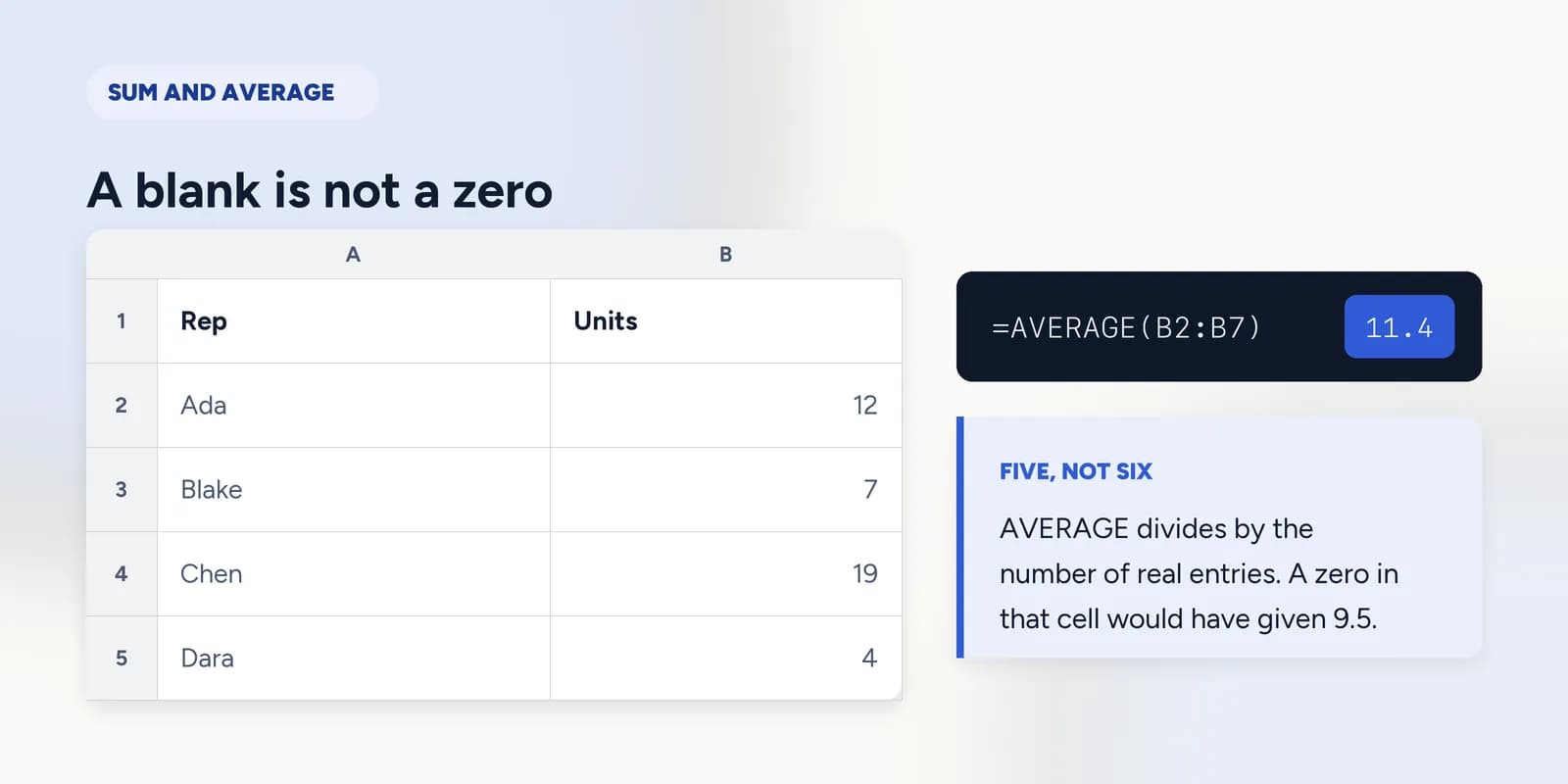
=AVERAGE(B2:B7)Here it makes every difference: the total is divided by five, the number of real entries, not by six, the number of rows.
If Fay's cell held a zero rather than nothing, the same formula would divide by six and return 9.5. Both answers are defensible and they are answers to different questions: one is the average of the reps who sold anything, the other is the average across the team. Excel cannot tell which you meant, so it tells you what it did by ignoring the blank.
COUNT and COUNTA disagree on purpose
COUNT counts cells holding a number. COUNTA counts cells holding anything at all. Run both over the same range and the gap between them is the number of cells that contain something which is not a number, which is the fastest diagnostic in Excel.
=COUNTA(B1:B7)-COUNT(B1:B7)One: the heading in B1. Over a column with no heading, any answer above zero means something in there is text, and your total is too low.
The range that stops one row short
The commonest fault in a real spreadsheet is not a wrong formula. It is a correct formula over the wrong range: somebody added a row under the table and the total, written months earlier, carries on summing the rows it was told about.
- Nothing reports it. The total still calculates, still looks like a total, and is simply too small.
- It gets worse with time, because every row added below the range widens the gap.
- Writing the range one row deeper than the data, so it includes a blank line, means an inserted row lands inside it rather than below it.
What goes wrong
These are the mistakes this part exists to prevent. Each one is reasonable, which is why people make it and why nothing on the sheet objects.
Writing =SUM(B2:B6)/5 instead of =AVERAGE(B2:B6)
WhyIt gives the same answer today, and the 5 is right there in front of you to be counted.
InsteadUse AVERAGE. The divided version is a count frozen into the formula: add a row and it keeps dividing by five for ever.
Assuming a blank cell counts as zero
WhyIt looks like nothing, and nothing feels like zero. In a total it behaves exactly like zero, which reinforces the belief right up until you take an average.
InsteadDecide what the gap means. If a missing figure really is a zero, type the zero. If it means not recorded, leave it blank and let AVERAGE ignore it.
Trusting a total without checking the count
WhyA total that is ten per cent low looks exactly like a total that is correct, and nothing in the cell is marked.
InsteadPut COUNT beside the total while you are building the sheet. If it disagrees with the number of rows you can see, something in the column is text.
Common questions
How do I sum a column in Excel?
Click the cell under the column and type =SUM( then select the cells and press Enter, giving something like =SUM(B2:B7). Alt and = inserts the same formula with a range Excel guesses for you.
Does AVERAGE ignore blank cells in Excel?
Yes. Blank cells and text are left out of both the total and the count, so AVERAGE divides by the number of real numbers in the range. A cell containing zero is counted and does pull the average down.
What is the difference between COUNT and COUNTA?
COUNT counts only cells holding numbers. COUNTA counts every non-empty cell, including text. Subtracting one from the other tells you how many cells in a range are not numbers.
Why is my SUM wrong or showing zero?
Almost always because the figures are stored as text rather than numbers, which SUM skips without complaining. Look at the alignment: numbers sit on the right of the cell, text on the left. COUNT over the range confirms it.
What is the shortcut for AutoSum in Excel?
Alt and = on Windows, Cmd+Shift+T on a Mac. Excel inserts a SUM formula and guesses the range, which is worth checking rather than accepting.